
Chưa có sản phẩm trong giỏ hàng.
Hệ thống mạng, Hỗ trợ kỹ thuật, Mikrotik
Bảo mật chống tấn công Mikrotik Router OS

03
Th12
Th12
Hiện nay Router OS Mikrotik đã rất phổ thông, việc bảo mật phòng thủ trước các cuộc tấn công rất quan trọng. Hãy cùng Điện Lào Cai thực hiện các bước sau giúp bạn bảo mật Router của mình nhé.
1. Hãy đổi mật khẩu đăng nhập vào Router.
Hãy đổi mật khẩu ngay khi bắt đầu cấu hình thiết bị. Tuyệt đối không được sử dụng mật khẩu trắng mặc định hoặc mật khẩu dễ đoán.
Để đổi mật khẩu truy cập vào Router, vào Menu System→User.
Click chuột phải vào tài khoản và chọn Password…

2. Tắt hoàn toàn các dịch vụ không cần thiết trên Router.
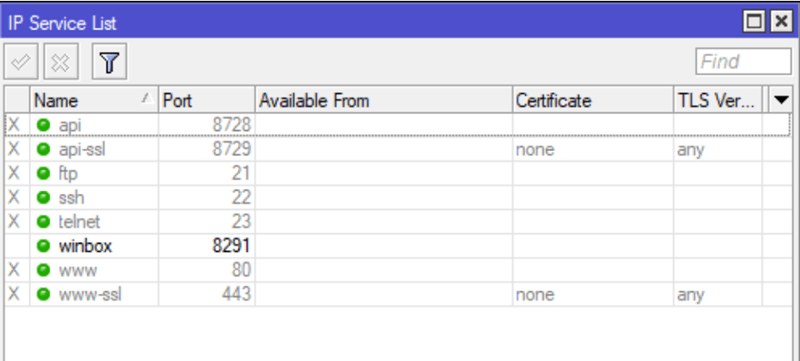
Để tránh tool quét bạn hãy tắt các dịch vụ không cần thiết của RouterOS. Việc này rất quan trọng, hãy thực hiện luôn sau khi đổi mật khẩu để tránh tool dò, quét Router của bạn. Để thực hiện, vào Menu IP→Services và tắt tất cả dịch vụ, chỉ trừ dịch vụ winbox.
3. Tắt dịch vụ khám phá thiết bị xung quanh trên Router.
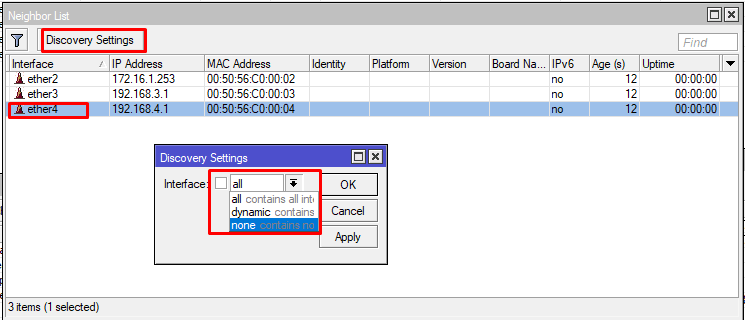
Khi bật winbox lên, chúng ta thường không để ý phần Neighbors tại sao hiện ra nhiều như vậy, đó là do tính năng khám phá thiết bị xung quanh được bật,để tắt tính năng này chúng ta vào IP –> Neighbors chọn none
4. Chống tấn công DNS vào Router. Tắt dịch vụ phân giải tên miền trên Router.
Tấn công theo kiểu DNS DoS là gì. Là khi Router của bạn bị rất nhiều connections từ ngoài vào port 53 trong khi số user trong mạng nội bộ rất ít, khiến hệ thống Router bạn cạn kiệt tài nguyên và sụp đổ.
Để chặn các truy vấn từ ngoài Internet, bạn thực hiện một vài thao tác tại thẻ Filter Rules trong Firewall, sẵn sàng chặn mọi yêu cầu phân giải DNS từ bên ngoài Internet vào Router.
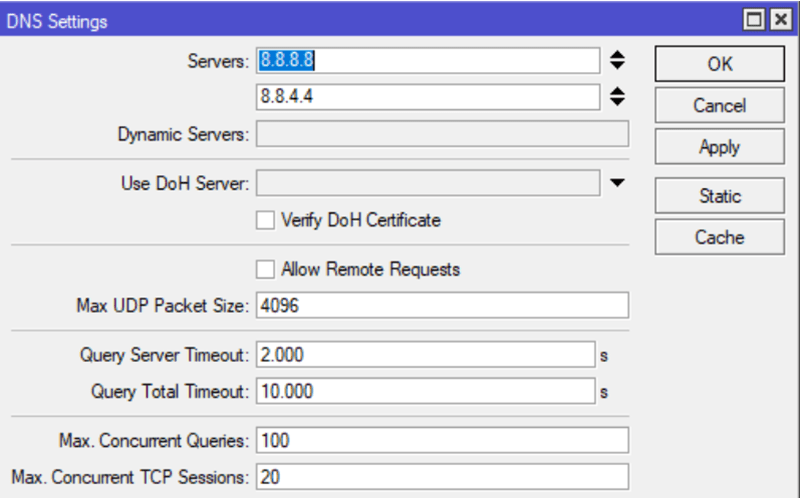
Ngoài ra, nếu bạn không sử dụng Router làm máy chủ phân giải tên miền-DNS trong mạng LAN, hãy tắt tính năng Allow Request Remote trong Menu IP → DNS. Bỏ tích vào mục Allow Remote Request.
5. Tắt máy chủ đo băng thông trên Router.
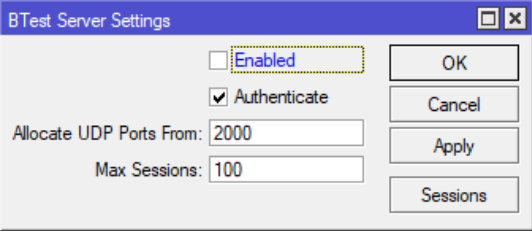
Vào Menu Tools→BTest Server và bỏ chọn Enable.
6. Cập nhật ngày giờ từ xa.
Vào Menu System→SNTP client và nhập vào Primary NTP Server nội dung: time.google.com
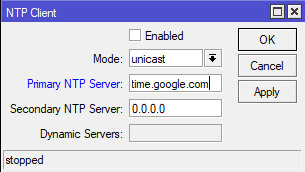
7. Tắt màn hình LCD và mã PIN trên Router có màn hình LCD.
Để tắt màn hình LCD,vào menu LCD và bỏ tích vào mục Enable.
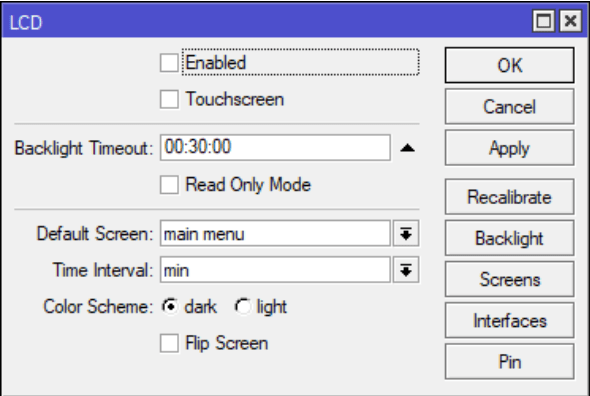
8. Tắt MAC Ping Server trên Router.
Để tắt MAC Ping Server, vào Menu Tools→MAC Server→MAC Ping Server. Bỏ chọn mục MAC Ping Server Enabled
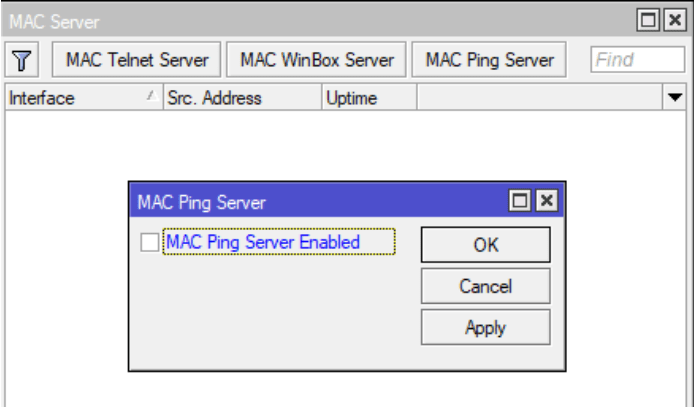
9. Bật dịch vụ phát hiện máy chủ DHCP giả mạo và IGMP trong mạng.
Vào mỗi Bridge đã tạo và tích chọn vào các mục sau: IGMP Snooping, DHCP Snooping, Add DHCP Option 82, Fast Forward
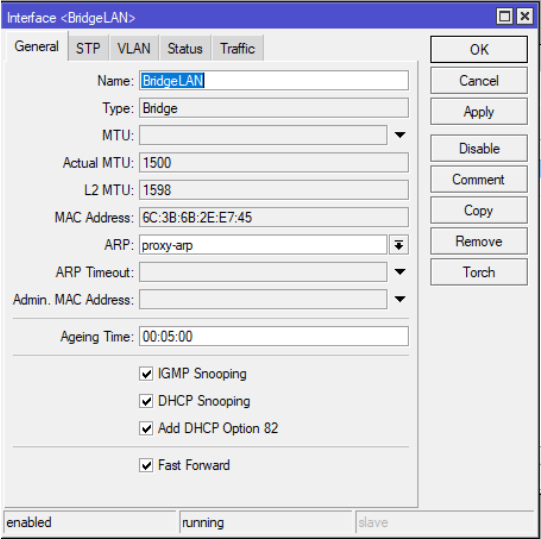
10. Chặn tấn công Brute Force cho Dịch vụ Winbox
Tuy đã tắt các dịch vụ ở mục số 2, tuy nhiên dịch vụ Winbox vẫn có nguy cơ tấn công từ xa. Bạn hãy sao chép và dán cụm lệnh bên dưới vào terminal để bảo vệ chặt chẽ hơn.
Lần đầu đăng nhập sai qua công cụ Winbox, người truy cập sẽ bị chặn trong vòng 1 phút, lần 2 sai bị chặn 6 giờ, lần 3 sai bị chặn 12 giờ. Quá 3 lần sai sẽ bị chặn 15 ngày.
/ip firewall filter
add action=drop chain=input comment="WinBox: Chan tu DanhSach" dst-port=8291 protocol=tcp src-address-list=ChanWinBox
add action=add-src-to-address-list address-list=ChanWinBox address-list-timeout=15d chain=input comment="WinBox: Them IP vao DanhSach" connection-state=new dst-port=8291 protocol=tcp src-address-list= WinBox_DanhSach_3
add action=add-src-to-address-list address-list=WinBox_DanhSach_3 address-list-timeout=1m chain=input comment="WinBox: Dang nhap sai lan 3" connection-state=new dst-port=8291 protocol=tcp src-address-list=WinBox_DanhSach_2
add action=add-src-to-address-list address-list=WinBox_DanhSach_2 address-list-timeout=6h chain=input comment="WinBox: Dang nhap sai lan 2" connection-state=new dst-port=8291 protocol=tcp src-address-list=WinBox_DanhSach_1
add action=add-src-to-address-list address-list=WinBox_DanhSach_1 address-list-timeout=12h chain=input comment="WinBox: Dang nhap sai lan 1" connection-state=new dst-port=8291 protocol=tcp
11. Chặn tấn công Brute Force cho Dịch vụ FTP
Tương tự với dịch vụ FTP. Lần đầu đăng nhập sai, người truy cập sẽ bị chặn trong vòng 1 phút, lần 2 sai bị chặn 3 giờ.
/ip firewall filter
add action=drop chain=input comment="FTP: Chan tu DanhSach" dst-port=21 protocol=tcp src-address-list=DanhSachFTP
add chain=output comment="FTP: Gioi han dang nhap" content="530 Login incorrect" dst-limit=1/1m,9,dst-address/1m protocol=tcp
add action=add-dst-to-address-list address-list=DanhSachFTP address-list-timeout=3h chain=output comment="FTP: Them IP vao DanhSach" content="530 Login incorrect" protocol=tcp
12. Chặn tấn công Brute Force cho Dịch vụ SSH
Tương tự với dịch vụ SSH. Lần đầu đăng nhập sai, người truy cập sẽ bị chặn trong vòng 1 giờ, lần 2 sai bị chặn 6 giờ, lần 3 sai bị chặn 12h
/ip firewall filter
add action=drop chain=input comment="SSH: Chan tu DanhSach" dst-port=22 protocol=tcp src-address-list=ChanSSH
add action=add-src-to-address-list address-list=ChanSSH address-list-timeout=4w2d chain=input comment="SSH: Them IP vao DanhSach" connection-state=new dst-port=22 protocol=tcp src-address-list=SSH_DanhSach_3
add action=add-src-to-address-list address-list=SSH_DanhSach_3 address-list-timeout=1h chain=input comment="SSH: Dang nhap sai lan 3" connection-state=new dst-port=22 protocol=tcp src-address-list=SSH_DanhSach_2
add action=add-src-to-address-list address-list=SSH_DanhSach_2 address-list-timeout=6h chain=input comment="SSH: Dang nhap sai lan 2" connection-state=new dst-port=22 protocol=tcp src-address-list=SSH_DanhSach_1
add action=add-src-to-address-list address-list=SSH_DanhSach_1 address-list-timeout=12h chain=input comment="SSH: Dang nhap sai lan 1" connection-state=new dst-port=22 protocol=tcp
add action=drop chain=forward comment="SSH: Chan" dst-port=22 protocol=tcp src-address-list=ChanSSH
13. Chặn tấn công Brute Force cho Dịch vụ Telnet
Tương tự với dịch vụ Telnet. Lần đầu đăng nhập sai, người truy cập sẽ bị chặn trong vòng 1 giờ, lần 2 sai bị chặn 6 giờ, lần 3 sai bị chặn 12h. Quá 3 lần bị chặn 30 ngày.
/ip firewall filter
add action=drop chain=input comment="Telnet: Chan tu DanhSach" dst-port=23 protocol=tcp src-address-list=ChanTelnet
add action=add-src-to-address-list address-list=ChanTelnet address-list-timeout=4w2d chain=input comment="Telnet: Them IP vao DanhSach" connection-state=new dst-port=23 protocol=tcp src-address-list=Telnet_DanhSach_3
add action=add-src-to-address-list address-list=Telnet_DanhSach_3 address-list-timeout=1h chain=input comment="Telnet: Dang nhap sai lan 3" connection-state=new dst-port=23 protocol=tcp src-address-list=Telnet_DanhSach_2
add action=add-src-to-address-list address-list=Telnet_DanhSach_2 address-list-timeout=6h chain=input comment="Telnet: Dang nhap sai lan 2" connection-state=new dst-port=23 protocol=tcp src-address-list=Telnet_DanhSach_1
add action=add-src-to-address-list address-list=Telnet_DanhSach_1 address-list-timeout=12h chain=input comment="Telnet: Dang nhap sai lan 1" connection-state=new dst-port=23 protocol=tcp
14. Sao lưu cấu hình trên Router.
Hãy luôn luôn tạo các bản sao lưu và tải về cất trữ cần thận. Vào Menu Files→Backup.
